
Burger Shift: Team Rush Guides
First-hour checklists, station maps, Drive-Thru packing, hired staff, and eight-player lobby rules.
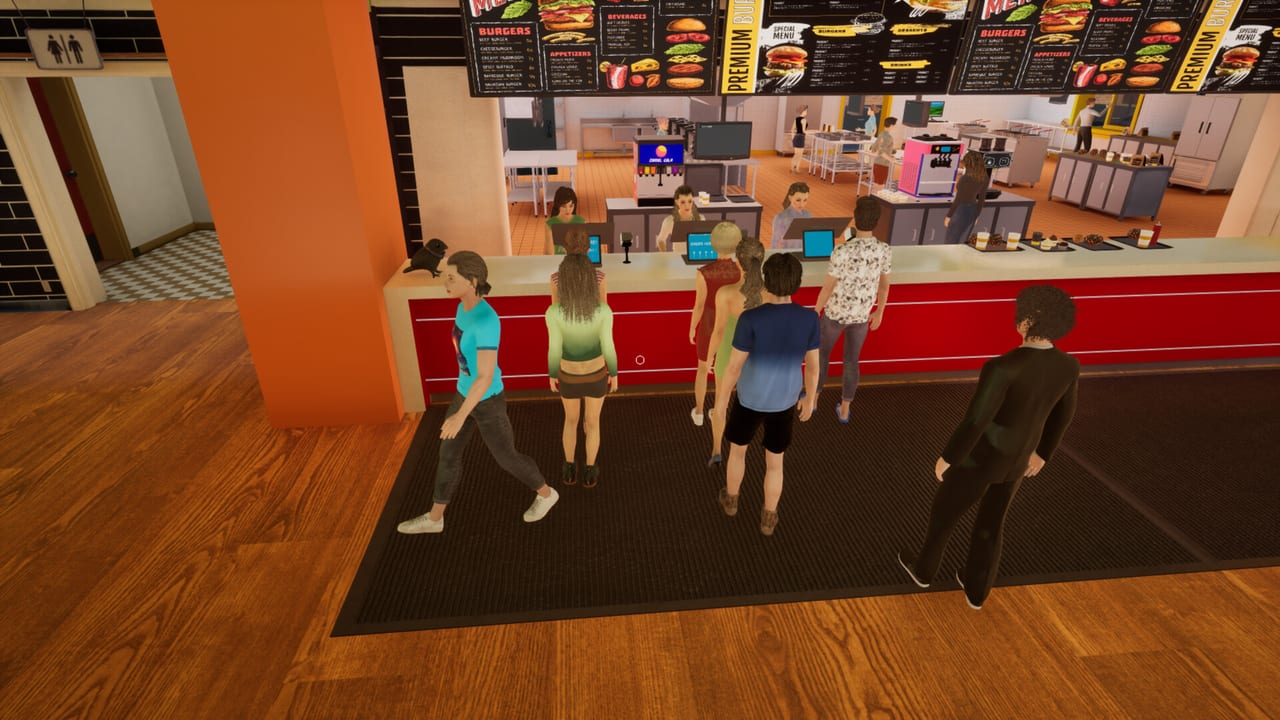
Burger Shift: Team Rush entered Early Access on 11 September 2026 as a first-person kitchen sim from Nova Telum Studio. You run a burger shop solo or with up to eight players: take tickets, flip patties, pour drinks, and keep impatient customers from walking out. This hub is the map of every kitchen walkthrough on the wiki. Read it once, then jump to the page that matches the station you keep failing.
The Early Access build is Windows-only on Steam (app 3804930). The free Prologue (app 3821150, 22 October 2025) and the older demo (app 4251300) taught the same loop with fewer stations. Hiring NPC employees, the fryer, ice cream, takeaway, and a complete Drive-Thru belong to the full Early Access feature set. If a friend is still on the Prologue, send them the Updates notes so you are talking about the same kitchen.
First hour and the input map
New crews should not open on Manager. Start with Getting Started: host or join the in-game lobby, stay on Trainee so customer patience is doubled, order patties, buns, and wrapping from the market computer, cook a single burger all the way through wrap, serve it, empty the bins, and close the day. That first loop teaches cash, tips, and the upgrade screen between shifts. The full Trainee / Supervisor / Manager split is on the Difficulty Guide. The market-to-truck loop is on Stock and Deliveries.
Once you can finish that loop, open Controls. Public footage confirms mouse-click interact, right-click to open packages or take-all from stacks, receipt hover previews, an inspection panel for Prep Pan contents, and a pause menu that lists players, ping, day, and difficulty — plus a host kick. The rest of the bind map lives in the in-game settings. Do not trust a copied movement table from another cooking game.
Grill timing and the station map
Burnt patties and cold wraps kill tips faster than a missing soda. How to Cook Burgers is the timing page: open the patty pack, drop meat on the flat top, flip around 85–90% doneness so the second side lands near 100%, cook both sides, then wrap. You can unwrap to inspect and fix fillings. Keep lettuce, tomato, onion, pickles, and sauces in reach, and use the inspection panel instead of guessing what sits in a Prep Pan.
When more than one person is in the kitchen, stop chasing the same ticket. Kitchen Stations splits grill, assembly, soda fountain, coffee machine, front of house, walk-in cooler, and dumpster. The Early Access build adds a fryer and ice cream / soft-serve. Pair that map with the role tier list so grill, wrap, drinks, and runner are not the same three people colliding at the flat top.
Drive-Thru, hired help, and eight-player chaos
Cars at night and bags at the window are not a Prologue-complete feature. The Drive-Thru Guide covers takeaway packing versus the dining room, player reports of two windows, and how to-go bags change the assembly rhythm. Staffing that lane is easier once you can hire employees. NPC staff clean tables and restock ingredients; hiring was locked in the Prologue and demo, so do not expect a hired runner on those builds.
Human players still do the cooking. The Co-op Guide explains solo versus a 1–8 player squad, online co-op and LAN co-op, built-in voice and text chat, name tags, the lobby, and how the host kicks from the pause menu. Solo cooks should stay on Trainee. Full lobbies can try Supervisor (about 10% more customers) or Manager (about 35% more) once roles are stable. Patience alerts and why there is no official complete off-switch live on Difficulty.
Roles, crew pages, and a shift plan
If you want a ranking instead of a walkthrough, start at the Tier List Hub and then the roles ranking. Those pages argue about who stands where. The Players Hub is the crew-facing side of the same problem: who hosts, who talks, who owns grill. Before a long session, plug names into the shift planner so you are not assigning drinks in voice chat after the first ticket prints.
Patch context lives under Updates. Store, Discord, and other official destinations are collected on Links. This wiki does not publish promo codes; Nova Telum Studio has not issued redeemable item codes for the Steam title.
Play the Early Access build on Windows. Steam Deck support is not confirmed. Community chatter often compares the loop to Fast Food Simulator; treat that as a feel comparison, not a claim that this kitchen is a copy. Use the pages above in order if you are new, or skip straight to the station that burned you last shift.
Frequently Asked Questions
Quick answers to the most common kitchen questions.
Which guide should I open first?
Read Getting Started for the first-hour loop, then Controls and How to Cook Burgers. Solo players should stay on Trainee until wrap and bins feel automatic.
Does this wiki cover the Prologue and the Early Access build?
Yes, and they are not the same kitchen. The Prologue is a separate Steam app. Fryer, ice cream, a complete Drive-Thru, takeaway, and hireable NPC employees belong to the full Early Access feature set. Check Updates before you assume a station exists in your build.
Where do I plan who stands where?
Use Kitchen Stations for the physical map, the role tier list for priority, and the shift planner before you fill a lobby. The Co-op Guide covers voice, kicks, and Trainee versus Manager.
Are there promo codes or a mobile version?
No promo codes, and this is not a mobile or Roblox title. It is a Windows Steam game. Official store and Discord destinations live on Links.
How do hired staff fit into these guides?
NPC employees clean tables and restock ingredients. They do not replace a human on the flat top. Read the Employees Guide after you can already cook and wrap without help.
How do Trainee, Supervisor, and Manager differ?
Trainee doubles customer patience. Supervisor adds about 10% more customers. Manager adds about 35%. Faster service still pays extra tips. There is no official complete patience off-switch. Read the Difficulty Guide.
Where do I order stock and meet the truck?
Use the market computer for patties, buns, and wrapping, then unload deliveries at the back. Right-click opens packs. Bins are outbound stock after Dumpster Duty. The loop is on Stock and Deliveries.