
Burger Shift: Team Rush Controls
What public builds actually show, plus why the in-game settings list is the only full bind map.
Burger Shift: Team Rush does not publish a complete public keybind table, and this page will not invent one. Mouse click to interact, right-click to open packages or take-all from stacks, receipt hover previews, and the pause menu are the inputs you can trust from footage and patch notes. Everything else — movement, drop, sprint if it exists, extra hotkeys — belongs in the in-game settings screen of the Early Access build that entered on 11 September 2026. If a chart on social media lists WASD, extra mouse buttons, or a full gamepad map as official, treat it as a guess until you see the same line in settings.
This is a first-person 3D kitchen on Windows Steam, not a mobile tap game and not Roblox. Playtest materials listed partial controller support. That is not the same thing as a verified full gamepad layout. If you prefer a pad, open settings on day one and test interact, rotate, and drop before you host a Manager lobby. Steam Deck support is not confirmed; do not assume the Deck Control layout is complete.
Confirmed mouse and world interactions
Click interacts with stations, tickets, doors, the market computer, and held tools such as the spatula. That is the primary verb. Right-click opens patty packages and performs take-all from stacks. You will use right-click constantly at the cooler and the dry stores. If a stack will not split, you are probably using the wrong mouse button, not a missing key.
The Dumpster Duty Prologue update (3 December 2025) added a stacking language the keyboard never needed to spell out: grab a whole stack, merge stacks, or place a single item from a held stack. Place-one is how you set a single bun or a single filling without dumping the entire armload onto the board. Practice it in a quiet Trainee minute, because lunch rush is a bad classroom for inventory finesse.
Burger Flow (7 November 2025) added the other half of the language. You can unwrap a burger to inspect or fix it, then wrap again. You can carry multiple small fillings at once — lettuce, onion, pickles — instead of jogging one leaf at a time. Hover a receipt to preview the order. Use that hover before you commit a wrap, especially when two tickets look similar from across the pass.
Inspection, Prep Pan, and patience alerts
The inspection panel shows Prep Pan contents. If you cannot remember whether a pan already has pickles, inspect it. Guessing is how you serve a loaded burger to a ticket that wanted a plain wrap. Combine inspection with receipt hover and you stop opening every bun like it is a mystery box.
Customer patience alerts name who is waiting, which table, and how much time is left. They are part of the control scheme even though they are not a keybind. Look at the side of the screen when the audio changes. A perfect ticket still fails if you never turn your head. Faster service earns extra tips; the alert is the prompt to move, not a decoration.
Pause menu: players, ping, kick, day, difficulty
Open the pause menu when the line is confusing, not only when you want to quit. It shows who is in the session, ping, the current day, and the difficulty. The host can kick from that menu. Use it. A silent extra body standing in the doorway is worse than a seven-player kitchen. Chat also signals join and leave, so you are not surprised when a seat fills behind you.
Name tags from Burger Flow help you aim voice chat at a person. Built-in voice and text chat mean you do not need a third-party overlay to call flip or drinks, though many crews still run one. The Co-op Guide covers lobby flow, online and LAN sessions, and why Trainee is the right solo setting. This page only cares that pause, kick, and name tags are tools, not lore.
Character creator is part of the control lesson
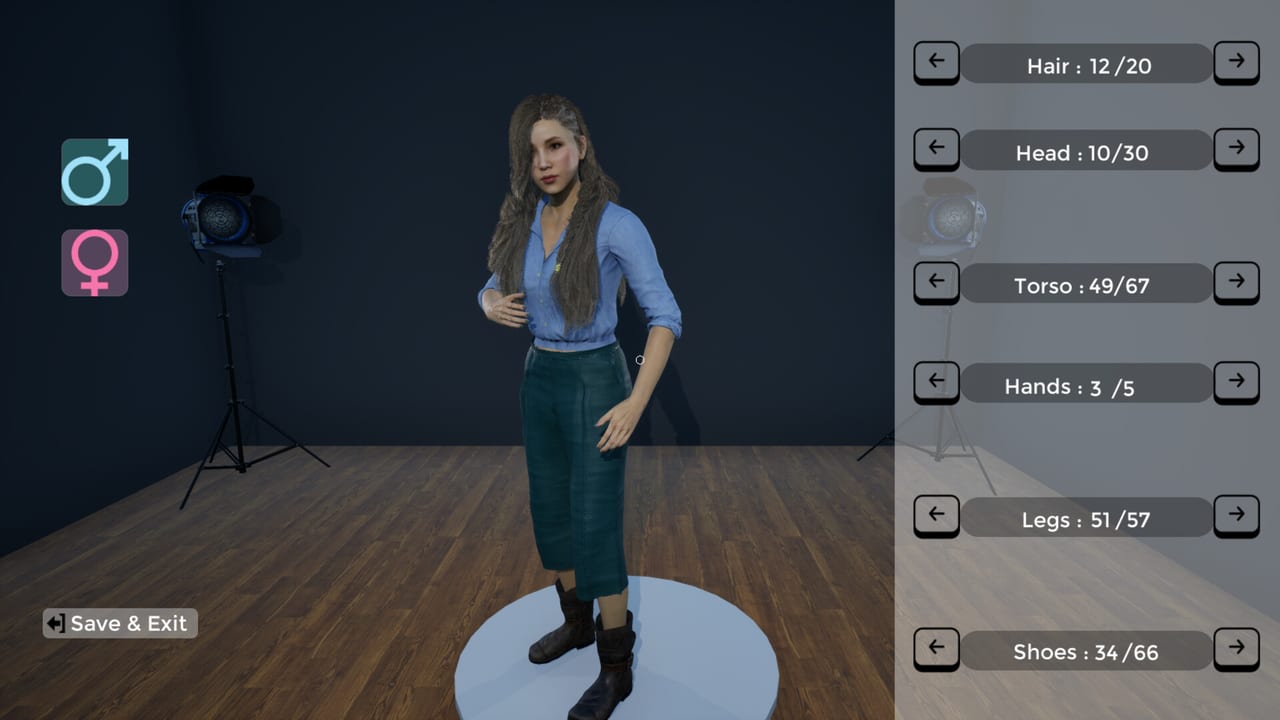
Hair, head, torso, hands, legs, and shoes are customizable. That is not a stats screen. Pick a silhouette your crew can read from across the flat top. If four people wear the same dark hoodie, name tags have to do all the work. Finish the creator, then walk the kitchen once without a ticket: cooler, grill, assembly, soda fountain, coffee machine, bins. That walk teaches reach and camera height better than a bind list.
What this wiki will not table
There is no official public list here for movement keys, crouch, jump, drop-all, emotes, or a complete Xbox / PlayStation map. Playtest notes mentioned partial controller support; they did not publish a full diagram. Check in-game settings after every patch. Nova Telum Studio can rebind or add actions in Early Access without a wiki rewrite catching every line.
Do not import a Fast Food Simulator bind sheet and assume it matches. Community talk often compares the loop, not the input map. The games are not the same executable. If an action does nothing, open settings, look for a conflict, and test it on Trainee with no customers before you blame the spatula.
How the confirmed inputs show up on the line
Open a patty pack with right-click, click the meat onto the flat top, click with the spatula to flip around 85–90% doneness, and cook both sides toward 100%. Carry fillings in a multi-stack, place one item if the ticket only wants a single pickle layer, wrap, then unwrap if inspection disagrees with the receipt. The cooking page, How to Cook Burgers, is the timing lesson; this page is why your hands can execute it.
At drinks and coffee, the same click verb applies. At the dumpster, click is empty, not decorate. At the market computer, click is the order, and the truck still arrives at the back. Kitchen Stations explains who should be standing at each of those verbs so eight people are not clicking the same grill.
If you are brand new, run the Getting Started first-hour list with these inputs only: click, right-click, hover, inspect, pause. When that loop is boring, add a second player and assign stations in the lobby. Settings remains the source of truth for every key this article refuses to guess.
Frequently Asked Questions
Quick answers to the most common kitchen questions.
Why is there no WASD or full keybind table on this page?
Because Nova Telum Studio has not published a complete public map, and playtest notes only listed partial controller support. Check the in-game settings in the Early Access build. Invented tables go stale the first time a patch rebinds an action.
What does right-click actually do?
It opens packages and can take-all from stacks. Use it on patty packs and storage stacks. To set one item down from a held stack, use the place-single move taught in Dumpster Duty rather than dumping the whole armload.
How do I see what is in a Prep Pan or on a ticket?
Hover the receipt for a preview. Open the inspection panel to see Prep Pan contents. Unwrap a burger if you need to fix fillings after the wrap. How to Cook Burgers walks through that inspect-and-fix loop.
Where do I kick a player?
The host kicks from the pause menu, which also lists players, ping, day, and difficulty. Details on lobby size, voice chat, and LAN versus online sit in the Co-op Guide.
Does a controller or Steam Deck work?
Playtest materials listed partial controller support. Steam Deck support is not confirmed. Test interact and stacking in settings before you host. This remains a Windows PC kitchen first.
What should I practice after I learn click and right-click?
Run the Getting Started hour on Trainee, then cook with the 85–90% flip on the grill page. When a second person joins, split verbs using Kitchen Stations.